useMemo Hook – React
Introduction
In the world of web development, creating performant and responsive user interfaces is crucial. React, a popular JavaScript library for building user interfaces, offers several tools to help developers achieve optimal performance. One such tool is the useMemo hook. In this blog, we will delve into the useMemo hook, explore its core concepts, and provide practical examples of how to use it effectively to enhance the performance of your React applications.
Understanding the useMemo Hook
The useMemo hook is a built-in feature in React that allows developers to memoize the result of a function or computation. Memoization involves storing the results of expensive function calls and reusing those results when the same inputs occur again. This optimization technique can significantly improve the performance of your React application by reducing unnecessary computations and rendering.
Core Concepts of useMemo
1. Caching Results
The primary purpose of useMemo is to cache the result of a function. When you use useMemo, it calculates the result of a provided function and stores it. If the function is called again with the same inputs, useMemo returns the cached result instead of recalculating it. This can save valuable computation time.
2. Dependency Array
useMemo takes a dependency array as its second argument. This array specifies the dependencies that, when changed, trigger the recalculation of the memoized value. By defining dependencies, you ensure that useMemo remains up-to-date when those dependencies change.
3. Performance Optimization
One of the key benefits of useMemo is performance optimization. By memoizing expensive calculations or data transformations, you can avoid recomputing them on every render. This is particularly valuable in scenarios where the same calculation is used across multiple components or renders.
Practical Use Cases
Now that we understand the core concepts, let’s explore some practical use cases for the useMemo hook.
1. Memoizing Expensive Computations
Suppose you have a component that performs a computationally expensive operation, such as generating a complex data structure. Without memoization, this operation could occur on every render, impacting performance. By using useMemo, you can calculate the data structure once and reuse it efficiently.
import React, { useMemo } from 'react';
function ExpensiveComponent({ input }) {
const result = useMemo(() => {
// Perform expensive computation based on 'input'
return computeResult(input);
}, [input]);
return <div>{result}</div>;
}Code language: HTML, XML (xml)In this example, the computeResult function is only called when the input changes, ensuring that the computation is optimized for performance.
2. Optimizing Component Rendering
When rendering components, you might encounter scenarios where a component’s rendering is computationally expensive. By memoizing the component, you can prevent unnecessary re-renders and enhance your application’s speed.
import React, { useMemo } from 'react';

function MemoizedComponent({ data }) {
  // Memoize the component to prevent unnecessary re-renders
  const memoizedData = useMemo(() => {
    return processData(data);
  }, [data]);

  return <div>{memoizedData}</div>;
}Code language: HTML, XML (xml)
By wrapping the component in useMemo, you ensure that it only re-renders when the data prop changes, optimizing rendering performance.
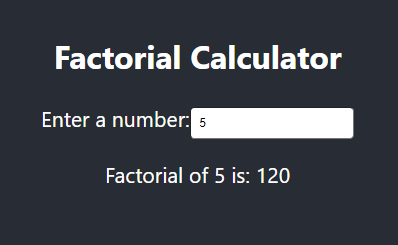
Here’s a simple example of how to use the useMemo hook in a React component. In this example, we’ll calculate the factorial of a number, and we’ll use useMemo to memoize the result.
import React, { useState, useMemo } from 'react';

function FactorialCalculator() {
  const [number, setNumber] = useState(5); // Initial number

  // Define a function to calculate the factorial of a number
  const calculateFactorial = (n) => {
    if (n <= 1) return 1;
    return n * calculateFactorial(n - 1);
  };

  // Use useMemo to memoize the factorial calculation
  const factorial = useMemo(() => calculateFactorial(number), [number]);

  return (
    <div>
      <h2>Factorial Calculator</h2>
      <label>
        Enter a number:
        <input
          type="number"
          value={number}
          onChange={(e) => setNumber(parseInt(e.target.value))}
        />
      </label>
      <p>
        Factorial of {number} is: {factorial}
      </p>
    </div>
  );
}

export default FactorialCalculator;
Code language: JavaScript (javascript)
Output :
Conclusion
React’s useMemo hook is a valuable tool for optimizing the performance of your applications. By understanding its core concepts and applying it to practical use cases, you can significantly enhance the efficiency and responsiveness of your React components.
Whether you’re memoizing expensive computations or optimizing component rendering, useMemo empowers you to create applications that provide a smooth and enjoyable user experience. Remember to carefully specify the dependency array to ensure that the memoized value remains up-to-date. With useMemo in your toolkit, you’re well-equipped to tackle performance challenges in your React projects and build blazing-fast user interfaces.
