Styling in React
Creating visually appealing user interfaces is a fundamental aspect of web development. When it comes to building user interfaces with React, styling plays a crucial role in making your web applications not only functional but also aesthetically pleasing.
Styling Components with CSS
One of the most common and traditional ways to style React components is by using Cascading Style Sheets (CSS). CSS allows you to define the appearance and layout of your components by targeting HTML elements with class names or IDs.
Here’s a basic example of how to apply CSS styles to a React component:
import React from 'react';
import './MyComponent.css'; // Import the CSS file
function MyComponent() {
return (
<div className="my-component">
<h1 className="title">Styled Component</h1>
<p className="description">This component is styled with CSS.</p>
</div>
);
}
export default MyComponent;Code language: HTML, XML (xml)In this example, we import an external CSS file (MyComponent.css) and apply class names to the HTML elements within the component. The CSS file might look like this:
/* MyComponent.css */
.my-component {
  background-color: #f0f0f0;
  border: 1px solid #ccc;
  padding: 20px;
}

.title {
  font-size: 24px;
  color: #333;
}

.description {
  font-size: 16px;
  color: #777;
}Code language: CSS (css)
Output :
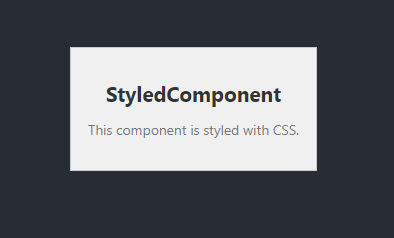
Using external CSS files can help maintain separation between your styles and your component logic, making your codebase more organized and manageable.
Challenges with Traditional CSS
While traditional CSS is widely used and easy to grasp, it has its limitations, especially when dealing with larger and more complex applications. Some challenges include:
- Global Scope: CSS class names can lead to naming conflicts and unintended style overrides when working on a large project with multiple developers.
- CSS Specificity: Managing CSS specificity can become cumbersome when you have nested components or complex styling requirements.
- Dead Code: It’s challenging to identify and eliminate unused CSS rules, which can lead to unnecessary bloat in your stylesheets.
To address these challenges and create a more efficient and maintainable styling approach, developers have turned to CSS-in-JS libraries.
Using CSS-in-JS Libraries
CSS-in-JS is a methodology for writing and managing styles in JavaScript. This approach allows you to encapsulate styles within your components, providing a more isolated and predictable styling solution. There are various CSS-in-JS libraries to choose from, each with its own syntax and features. One popular library is styled-components.
Here’s an example of using styled-components to style a React component:
import React from 'react';
import styled from 'styled-components';

// Define a styled component
const StyledComponent = styled.div`
  background-color: #f0f0f0;
  border: 1px solid #ccc;
  padding: 20px;
`;

const Title = styled.h1`
  font-size: 24px;
  color: #333;
`;

const Description = styled.p`
  font-size: 16px;
  color: #777;
`;

function MyComponent() {
  return (
    <StyledComponent>
      <Title>Styled Component</Title>
      <Description>This component is styled with styled-components.</Description>
    </StyledComponent>
  );
}

export default MyComponent;Code language: HTML, XML (xml)
Output :
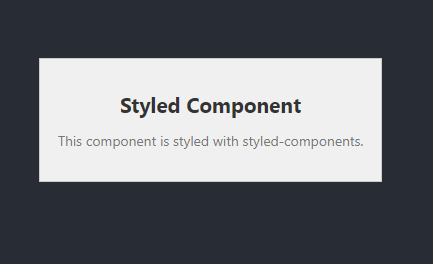
In this example, we import the styled function from styled-components and use tagged template literals to define styled components. These components can then be used just like regular React components.
Using Inline Style
Mastering Inline Styles in React
React, the JavaScript library for building user interfaces, provides various methods for styling your components. While using CSS and CSS-in-JS libraries are common approaches, React also allows you to apply styles directly to individual components using inline styles. In this article, we’ll explore the concept of inline styles in React, understand how to use them effectively, and discuss scenarios where they can be advantageous.
What Are Inline Styles in React?
Inline styles in React are a way to define and apply styles directly to individual JSX elements or components. Instead of using an external CSS file or a CSS-in-JS library, This approach provides a unique and component-specific way of styling your elements.
How to Apply Inline Styles
To use inline styles in React, you define the style attribute of an element. The style attribute accepts a CSS where the keys are camelCased CSS property names, and the values are the corresponding CSS property values.
Here’s an example of how to use inline styles in React:
import React from 'react';

function InlineStyledComponent() {
  return (
    <div style={{ backgroundColor: 'lightblue',
          padding: '20px',
          border: '1px solid #ccc',
          fontSize: '18px',}}>
      This component is styled using inline styles.
    </div>
  );
}

export default InlineStyledComponent;Code language: JavaScript (javascript)
Output :
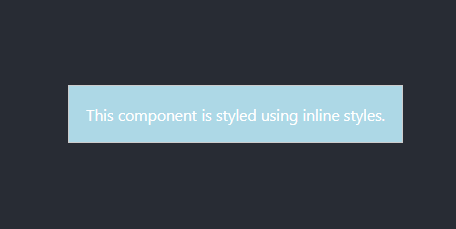
In this example, We then apply these styles to the <div> element using the style attribute.
Advantages of Inline Styles
- Component-Level Styles: Inline styles are ideal for situations where you want to apply styles to a specific component without affecting other elements on the page. This level of granularity allows for a component to have its unique look and feel.
- Dynamic Styling: Since inline styles are defined as JavaScript objects, you can easily make them dynamic by using variables or computed values. This dynamic nature makes inline styles suitable for components with changing styles based on user interactions or data.
- Server-Side Rendering (SSR): Inline styles can work well with server-side rendering in React. Since styles are encapsulated within the component, they can be efficiently rendered on the server and hydrated on the client.
Challenges and Considerations
While inline styles have their advantages, they also come with some challenges and considerations:
- Limited Preprocessing: Inline styles do not support advanced CSS features like variables or nesting, which are available in traditional CSS or pre-processors like SASS.
- Maintainability: If not managed properly, inline styles can clutter your component code, making it less readable. Consider using helper functions or objects to organize your styles.
- Specificity: Inline styles have high specificity, which means they can override external styles. Be cautious when using them in conjunction with external CSS.
When to Use Inline Styles
Inline styles are a valuable tool in your styling toolkit, but they are not a one-size-fits-all solution. Here are some scenarios where inline styles are particularly useful:
- Component Reusability: When you want to create a reusable component with its unique styling, inline styles allow you to encapsulate those styles within the component itself.
- Dynamic Styling: For components that require dynamic styling based on changing conditions, inline styles make it easy to adapt to these changes.
- Prototyping and Quick Iterations: Inline styles are great for prototyping or rapidly iterating on the visual aspects of a component without the need to create external styles.
Benefits of CSS-in-JS Libraries
CSS-in-JS libraries offer several advantages over traditional CSS:
- Isolation: Styles are scoped to the component, reducing the risk of naming conflicts.
- Dynamic Styles: You can generate styles dynamically based on component props or state.
- Dead Code Elimination: Only the styles used in your application are included, minimizing the size of your stylesheets.
- Component Reusability: Styled components can be easily reused across your application.
While styled-components is one of the most popular CSS-in-JS libraries, other libraries like Emotion and Radium provide similar functionality. The choice of library depends on your specific project requirements and personal preferences.
Using Pre-Processors like SASS
Another way to enhance your styling capabilities in React is by using pre-processors like SASS. SASS (Syntactically Awesome Style Sheets) extends the functionality of CSS by introducing features like variables, nesting, and mixins.
Here’s a simple example of using SASS to style a React component:
import React from 'react';
import './MyComponent.scss'; // Import the SASS file

function MyComponent() {
  return (
    <div className="my-component">
      <h1 className="title">Styled Component</h1>
      <p className="description">This component is styled with SASS.</p>
    </div>
  );
}

export default MyComponent;Code language: HTML, XML (xml)
The associated SASS file (MyComponent.scss) might look like this:
/* MyComponent.scss */
.my-component {
  background-color: #f0f0f0;
  border: 1px solid #ccc;
  padding: 20px;

  .title {
    font-size: 24px;
    color: #333;
  }

  .description {
    font-size: 16px;
    color: #777;
  }
}Code language: HTML, XML (xml)
SASS simplifies styling by providing features like variables for color schemes, nesting for cleaner structure, and mixins for reusable styles.
When to Use Each Styling Method
The choice of styling method in React depends on your project’s requirements, team preferences, and the level of control you need over your styles. Here’s a summary to help you decide:
- Traditional CSS: Use this approach for smaller projects or when you want to maintain a clear separation between styles and component logic.
- CSS-in-JS: Consider CSS-in-JS libraries like styled-components for larger applications, complex styling requirements, or when you want to encapsulate styles within components.
- SASS: Opt for pre-processors like SASS if you need advanced CSS features, such as variables and mixins, and prefer a more organized and maintainable stylesheet structure.
Conclusion
Styling in React is a critical aspect of creating user-friendly and visually appealing web applications. Whether you choose traditional CSS, CSS-in-JS libraries, or pre-processors like SASS, the goal is to make your styles efficient, maintainable, and adaptable to different project scenarios.
By understanding the strengths and use cases of each styling method, you can make informed decisions and ensure that your React applications not only function flawlessly but also look stunning.
In summary:
- Traditional CSS is suitable for small projects and maintaining separation between styles and component logic.
- CSS-in-JS libraries like styled
-components provide isolation and dynamic styling for larger and more complex applications.
- Pre-processors like SASS offer advanced CSS features and a structured approach to styling.
Whichever method you choose, the key is to create user interfaces that not only meet functional requirements but also leave a lasting visual impression.
Related posts:

Powered by YARPP.