JavaScript – While Loop
In JavaScript, the “while loop” is a fundamental construct that allows you to create iterative processes in your code. It’s like having a set of instructions that will be executed repeatedly as long as a certain condition remains true. Let’s delve into the world of while loops in a way that’s easy to understand.
Flow Chart Of While Loop :
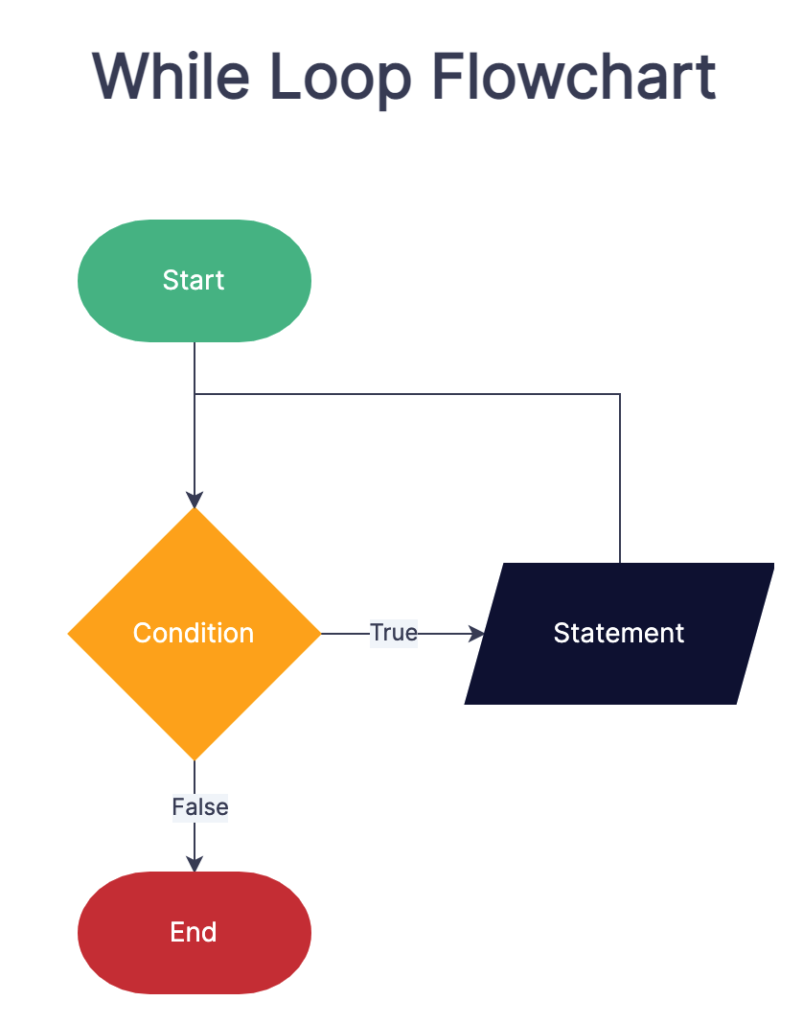
Understanding the While Loop
Think of the while loop as a handy tool for automating tasks that need to be repeated until a specific condition is met. It’s like telling your program, “Keep doing this as long as a certain condition holds true.”
Syntax of the While Loop
The basic structure of a while loop looks like this:
while (condition) {
// Code to execute as long as the condition is true
}Code language: JavaScript (javascript)Here’s the breakdown:
condition: This is the test that’s evaluated before each iteration. If the condition is true, the code block inside the loop gets executed.
How a While Loop Works
- The while loop starts by evaluating the condition. If the condition is true, the code block inside the loop is executed.
- After the code block executes, the condition is evaluated again. If it’s still true, the code block runs again. This process repeats until the condition becomes false.
- Once the condition becomes false, the loop exits, and your program moves on to the next task.
Common Use Cases
While loops are incredibly versatile and find use in various scenarios:
- Iterating Through Arrays: You can use a while loop to go through all the elements in an array one by one.
- User Input Validation: When you need to ensure that a user’s input meets specific criteria, a while loop can keep prompting them until the condition is met.
- Reading Files: In server-side programming, while loops are often used to read data from files until the end of the file is reached.
Practical Example
Let’s take a look at a simple example to illustrate how a while loop works. Suppose you want to print numbers from 1 to 5:
let number = 1;
while (number <= 5) {
  console.log(number);
  number++;
}Code language: JavaScript (javascript)
In this example, the condition number <= 5 is evaluated. As long as it’s true, the loop continues to print the current value of number and increments it by 1. Once number becomes 6, the condition becomes false, and the loop exits.
Conclusion
The while loop is a powerful and essential construct in JavaScript that allows you to automate repetitive tasks in your code. By setting a condition, you can control how many times a block of code is executed, making it an indispensable tool for building dynamic and interactive applications.
Related posts:
 JavaScript – For Loop
JavaScript – Loop Control
JavaScript for…in loop
JavaScript – if…else Statement
Powered by YARPP.