JavaScript – Loop Control
In JavaScript, loop control is a crucial aspect of writing efficient and effective code. It allows you to control the flow of loops, determining when they start, continue, or stop. Let’s explore loop control in plain language.
Understanding Loop Control
Loop control provides you with the ability to manage how loops operate. It allows you to control when a loop starts, how it progresses, and when it terminates. This control is essential for creating loops that perform specific tasks and avoid infinite iterations.
Types of Loop Control Statements
In JavaScript, there are several loop control statements:
1. break: The break statement is used to exit a loop prematurely. When a break statement is encountered within a loop, it immediately terminates the loop, and the program continues with the next statement outside the loop.
Example :
for (let i = 1; i <= 10; i++) {
if (i === 5) {
console.log("Found the number 5. Exiting loop.");
break;
}
console.log(i);
}Code language: JavaScript (javascript)Output :
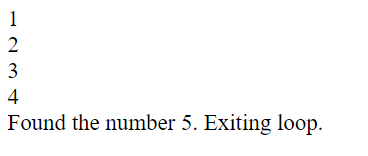
In this example, the loop iterates from 1 to 10. When it reaches i === 5, the break statement is triggered, and the loop terminates prematurely.
2.continue: The continue statement is used to skip the current iteration of a loop and move to the next one. It allows you to skip specific iterations based on a condition without exiting the loop entirely.
Example :
for (let i = 1; i <= 10; i++) {
  if (i % 2 === 0) {
    // Skip even numbers
    continue;
  }
  console.log(i);
}Code language: JavaScript (javascript)
Output :
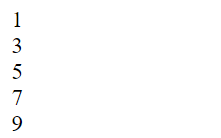
In this example, the loop iterates from 1 to 10. When it encounters an even number, the continue statement skips that iteration and moves to the next one, effectively printing only odd numbers.
3.return: While not specifically a loop control statement, the return statement can be used to exit a function, which effectively terminates any loop within that function.
Example :
function findValue(arr, target) {
  for (let i = 0; i < arr.length; i++) {
    if (arr[i] === target) {
      return i; // This will exit the loop and the function when target is found
    }
  }
  return -1; // If target is not found in the array
}
Code language: JavaScript (javascript)
Common Use Cases
Loop control statements are valuable in various scenarios:
- Error Handling: When you encounter an error condition within a loop, you can use
breakto exit the loop and handle the error gracefully. - Skipping Iterations: The
continuestatement is useful when you want to skip certain iterations, such as filtering out specific elements while iterating through an array. - Infinite Loops: To prevent infinite loops, you can include conditional checks and use
breakto exit the loop when a specific condition is met.
Conclusion
Loop control statements in JavaScript are essential tools for managing the flow of loops. They help you exit loops when needed, skip specific iterations, and handle various scenarios efficiently. By using break, continue, and return appropriately, you can create more controlled and effective loops in your JavaScript code.
Related posts:

Powered by YARPP.