JavaScript HTML DOM Elements
Introduction
In the realm of web development, mastering JavaScript HTML DOM (Document Object Model) elements is akin to gaining control over the building blocks of interactivity. These elements are the foundation upon which dynamic and engaging web applications are constructed. In this comprehensive guide, we will unravel the world of JavaScript HTML DOM elements, exploring their significance, attributes, manipulation techniques, and real-world examples.
Exploring HTML DOM Elements
To grasp the significance of HTML DOM elements, let’s explore some of the fundamental aspects of these elements.
1. Element Hierarchy:
HTML DOM elements are organized in a hierarchical structure, with each element having a parent, children, and siblings. This hierarchy is crucial for understanding how elements are related to each other within a web page. For example:
<!DOCTYPE html>
<html>
<head>
<title>Sample Page</title>
</head>
<body>
<h1>Welcome to My Website</h1>
<p>This is a paragraph of text.</p>
<ul>
<li>Item 1</li>
<li>Item 2</li>
</ul>
</body>
</html>Code language: HTML, XML (xml)In this example, the <html> element is the root of the hierarchy. It contains the <head> and <body> elements as its children. Within the <body>, there are an <h1> element, a <p> element, and a <ul> element. The <ul> element further contains two <li> elements.
Understanding this hierarchy is essential when selecting and manipulating elements through JavaScript.
2. Selecting Elements:
JavaScript provides various methods for selecting HTML DOM elements. These methods are essential for accessing specific elements within a web page’s structure:
document.getElementById(id): Selects an element by its unique ID attribute.document.getElementsByClassName(className): Selects elements with a specific class name.document.getElementsByTagName(tagName): Selects elements by their HTML tag name.document.querySelector(selector): Selects the first element that matches a CSS selector.document.querySelectorAll(selector): Selects all elements that match a CSS selector.
Here are some examples of selecting elements:
const headerElement = document.getElementById("header");
const paragraphs = document.getElementsByTagName("p");
const firstListItem = document.querySelector("ul li");
const highlightedElements = document.querySelectorAll(".highlight");Code language: JavaScript (javascript)
These selection methods empower you to precisely target elements for manipulation.
3. Manipulating Elements:
Once you’ve selected HTML DOM elements, you can manipulate them in various ways using JavaScript. Some common manipulation techniques include:
- Changing Text Content: Modify the text content of an element.
- Changing HTML Content: Alter the HTML content of an element, including adding new elements.
- Modifying Attributes: Change element attributes such as
srcfor images orhreffor links. - Adding and Removing Classes: Manipulate element classes to apply or remove styles.
- Creating New Elements: Generate new HTML elements dynamically and append them to the DOM.
- Removing Elements: Delete elements from the DOM structure.
These manipulation techniques allow you to update the content, appearance, and behavior of your web page dynamically.
4. Event Handling:
HTML DOM elements can respond to user interactions through event handling. Event listeners are attached to elements to trigger specific actions when events occur. Common events include clicks, mouse movements, keyboard inputs, and form submissions. Event listeners allow you to create interactive features such as pop-up dialogs, form validation, and more.
Here’s an example of adding an event listener to a button element:
const button = document.getElementById("myButton");

button.addEventListener("click", function () {
    alert("Button clicked!");
});Code language: JavaScript (javascript)
In this example, an alert message appears when the button is clicked, demonstrating how events can be used to enhance interactivity.
Real-World Example: Building an Interactive Form
To put these concepts into practice
, let’s create a simple interactive form using HTML DOM elements and JavaScript. Our form will validate user input and provide feedback.
Here’s the HTML structure:
<!DOCTYPE html>
<html>
<head>
    <title>Interactive Form</title>
</head>
<body>
    <h1>Contact Us</h1>
    <form id="contactForm">
        <label for="name">Name:</label>
        <input type="text" id="name" required>
        <span id="nameError" class="error"></span>
        <label for="email">Email:</label>
        <input type="email" id="email" required>
        <span id="emailError" class="error"></span>
        <button type="submit">Submit</button>
    </form>
    <script src="form.js"></script>
</body>
</html>Code language: HTML, XML (xml)
In this form, we have input fields for name and email, along with error message spans. The JavaScript file form.js will handle form validation and interactivity.
Here’s how we can implement form validation and feedback in form.js:
const form = document.getElementById("contactForm");
const nameInput = document.getElementById("name");
const emailInput = document.getElementById("email");
const nameError = document.getElementById("nameError");
const emailError = document.getElementById("emailError");

form.addEventListener("submit", function (event) {
    let valid = true;

    if (nameInput.value.trim() === "") {
        nameError.textContent = "Name is required";
        valid = false;
    } else {
        nameError.textContent = "";
    }

    if (emailInput.value.trim() === "") {
        emailError.textContent = "Email is required";
        valid = false;
    } else {
        emailError.textContent = "";
    }

    if (!valid) {
        event.preventDefault(); // Prevent form submission if validation fails
    }
});Code language: JavaScript (javascript)
Output :
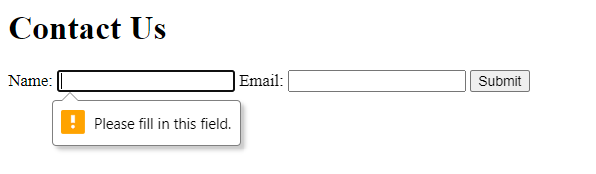
In this example, we select form elements by their IDs and add an event listener to the form’s submit event. When the form is submitted, we validate the name and email fields. If validation fails, we display error messages and prevent the form from being submitted.
Conclusion
HTML DOM elements are the fundamental building blocks of interactive web development. Understanding these elements and how to manipulate them through JavaScript is essential for creating dynamic and engaging web applications. With the ability to access, modify, and respond to elements, you can craft web experiences that captivate users and provide real-time interactivity.
As you continue your journey in web development, remember that HTML DOM elements are your tools for building web applications that not only look great but also respond to user actions seamlessly. Whether you’re creating forms, interactive games, or complex web applications, a solid understanding of HTML DOM elements is your gateway to success in the world of web development.
Related posts:

Powered by YARPP.