HTML – Phrase Tags
HTML phrase tags are used to apply specific formatting or semantics to a portion of text within a web page. These tags allow web developers to enhance the presentation and meaning of text content. Here are some commonly used HTML phrase tags:
1. <em> (Emphasis): The <em> tag is used to emphasize text. Browsers typically render it as italicized text. For example, <em>important</em> would be displayed as important.
<!DOCTYPE html>
<html lang="en">
<head>
<title> Emphasis Example </title>
</head>
<body>
<p>This is a paragraph of <em>emphasized text</em>.</p>
</body>
</html>Code language: HTML, XML (xml)Output :
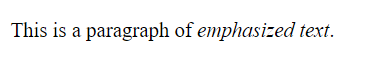
In this example, the text “emphasized text” is enclosed within the <em> element. When rendered in a web browser, it will typically appear in italics, indicating that it is emphasized within the paragraph. The exact rendering may vary depending on the browser’s default styles or any custom CSS applied to the page.
2. <strong> (Strong Importance): The <strong> tag is used to indicate strong importance or significance. Browsers typically render it as bold text. For example, <strong>urgent</strong> would be displayed as urgent.
<!DOCTYPE html>
<html lang="en">
<head>
    <title> strongly Example </title>
</head>
<body>
    <p>This is a <strong>strongly emphasized</strong> statement.</p>
</body>
</html>Code language: HTML, XML (xml)
Output :

In this example, the text “strongly emphasized” is enclosed within the <strong> element. When rendered in a web browser, it will typically appear in bold, indicating its strong importance within the paragraph. The exact rendering may vary depending on the browser’s default styles or any custom CSS applied to the page.
3. <mark> (Highlight): The <mark> tag is used to highlight text for reference or emphasis. Browsers typically render it with a yellow background. For example, <mark>key point</mark> would be displayed as a highlighted “key point.”
<!DOCTYPE html>
<html lang="en">
<head>
    <title> Mark Example </title>
</head>
<body>
    <p>This is a <mark>highlighted</mark> section of text.</p>
</body>
</html>Code language: HTML, XML (xml)
Output :

In this example, the word “highlighted” is enclosed within the <mark> element. When rendered in a web browser, it will typically have a background color applied to it, making it stand out from the surrounding text. The exact rendering may vary depending on the browser’s default styles or any custom CSS applied to the page.
4. <abbr> (Abbreviation): The <abbr> tag is used to define abbreviations or acronyms. It can also include optional title text that provides additional information when the user hovers over the abbreviation. For example, <abbr title="World Health Organization">WHO</abbr> would be displayed as WHO, with “World Health Organization” as a tooltip.
<!DOCTYPE html>
<html lang="en">
<head>
    <title> Abbr Example </title>
</head>
<body>
    <p><abbr title="World Wide Web">WWW</abbr> is an abbreviation for the World Wide Web.</p>
</body>
</html>Code language: HTML, XML (xml)
Output :
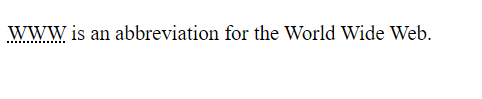
In this example, we’ve used the <abbr> element to define the abbreviation “WWW” and provided the full expansion of the abbreviation as the title attribute. When a user hovers over the abbreviation in a web browser, they may see a tooltip or additional information (in this case, “World Wide Web”) to explain the abbreviation’s meaning.
The use of the <abbr> element is beneficial for accessibility and providing clarity to users, especially when dealing with technical terms or industry-specific abbreviations.
5. <code> (Code): The <code> tag is used to represent inline code or programming code within a text. Browsers typically render it with a monospaced font. For example, <code>var x = 5;</code> would be displayed as var x = 5;.
<!DOCTYPE html>
<html lang="en">
<head>
<title> Code Example </title>
</head>
<body>
<p>Here's a simple HTML example:</p>
<code>
<html>
<head>
<title>My Web Page</title>
</head>
<body>
<h1>Hello, World!</h1>
</body>
</html>
</code>
</body>
</html>Code language: HTML, XML (xml)Output :

In this example, we’ve used the <code> element to represent an HTML code snippet. The HTML tags and code are displayed in a monospaced font, maintaining their formatting and structure. The browser doesn’t interpret or execute this code; it’s purely for display purposes.
The <code> element is commonly used when displaying code examples, programming instructions, or any content that needs to be presented in a code-like format.
6. <cite> (Citation): The <cite> tag is used to define the title of a creative work, such as a book, movie, or song. It is often rendered in italics. For example, <cite>The Great Gatsby</cite> would be displayed as The Great Gatsby.
<!DOCTYPE html>
<html lang="en">
<head>
    <title> Code Example </title>
</head>
<body>
    <p>The book <cite>The Great Gatsby</cite> by F. Scott Fitzgerald is a classic of American literature.</p>
</body>
</html>Code language: HTML, XML (xml)
Output :

In this example, we’ve used the <cite> element to indicate the title of the book “The Great Gatsby.” The <cite> element is used to semantically mark the title of the work, making it clear that it’s a citation or reference.
The use of the <cite> element helps improve the semantics and accessibility of your HTML documents, making it easier for search engines and assistive technologies to identify and understand citations and references within your content.
7. <q> (Quotation): The <q> tag is used to enclose short inline quotations. Browsers typically render it with quotation marks. For example, <q>This is a short quote.</q> would be displayed as “This is a short quote.”
<!DOCTYPE html>
<html lang="en">
<head>
    <title> Code Example </title>
</head>
<body>
    <p>Albert Einstein once said, <q>E=mc²</q>, which is the famous equation for the theory of relativity.</p>
</body>
</html>Code language: HTML, XML (xml)
Output :

In this example, we’ve used the <q> element to enclose the quoted text “E=mc².” The <q> element adds quotation marks around the quoted text to visually indicate that it’s a quotation.
It’s important to note that the <q> element is designed for short inline quotations. For longer block quotations, you should use the <blockquote> element. The use of <q> helps maintain the semantic structure of your HTML and provides clarity for both users and search engines.
8. <blockquote> (Block Quotation): The <blockquote> tag is used to define longer block quotations. It often renders the text with indentation or different styling, depending on the CSS applied.
<!DOCTYPE html>
<html lang="en">
<head>
    <title> Code Example </title>
</head>
<body>
    <blockquote>
        <p>Two things are infinite: the universe and human stupidity; and I'm not sure about the universe.</p>
        <footer>- Albert Einstein</footer>
    </blockquote>
</body>
</html>Code language: HTML, XML (xml)
Output :

In this example:
- The
<blockquote>element is used to enclose the quoted text, which consists of a paragraph. - The
<footer>element is used to indicate the source of the quotation, and it includes the author’s name, Albert Einstein, in this case.
When rendered in a web browser, the text inside the <blockquote> element is typically indented or styled to visually distinguish it as a quotation. The <footer> element can be used to provide attribution or other information about the source of the quote.
9. <sub> (Subscript) and <sup> (Superscript): These tags are used to format text as a subscript or superscript, respectively. For example, <sub>CO<sub>2</sub></sub> would display CO₂ with the 2 as a subscript, and <sup>x</sup>² would display x² with the 2 as a superscript.
<!DOCTYPE html>
<html lang="en">
<head>
    <title> Code Example </title>
</head>
<body>
    <p>H<sub>2</sub>O is the chemical formula for water, and E=mc<sup>2</sup> is Einstein's famous equation.</p>
</body>
</html>Code language: HTML, XML (xml)
Output :

In this example:
<sub>is used to create subscript text, as seen in the chemical formula for water, where the “2” is lowered slightly below the baseline.<sup>is used to create superscript text, as seen in Einstein’s equation, where the “2” is raised above the baseline.
These elements are commonly used in scientific and mathematical contexts to format formulas, chemical notations, and other content where subscript and superscript text is necessary.
These HTML phrase tags help structure and style text content on web pages, making it more readable and conveying additional meaning or emphasis where necessary.
