HTML – Lists
In HTML, lists are a fundamental way to organize and structure content on a web page. There are three main types of lists: ordered lists, unordered lists, and definition lists.
- Ordered Lists (
<ol>):
- Ordered lists are used to present items in a specific sequence or order.
- Each item in an ordered list is represented by an
<li>(list item) element. - By default, ordered lists are numbered, but you can customize the numbering style using CSS. Example:
<!DOCTYPE html>
<html>
<head>
<title>Ordered List Example</title>
</head>
<body>
<h1>Fruit Selection</h1>
<p>Choose your favorite fruits:</p>
<ol>
<li>Apples</li>
<li>Bananas</li>
<li>Oranges</li>
<li>Grapes</li>
</ol>
<p>These are some delicious options!</p>
</body>
</html>
Code language: HTML, XML (xml)Output :
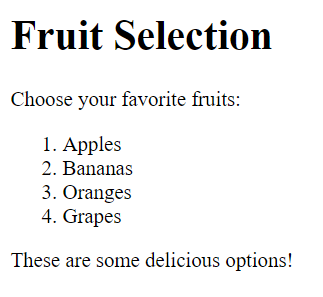
In this example, we have an ordered list (<ol>) containing four list items (<li>) that represent different types of fruits. The numbers 1, 2, 3, and 4 are automatically generated by the browser to indicate the order of the items. This is the default behavior for ordered lists, but you can customize the numbering style using CSS if needed.
- Unordered Lists (
<ul>):
- Unordered lists are used for items that do not have a particular order or sequence.
- Each item in an unordered list is also represented by an
<li>element. - Bullets or other markers are used by default, but you can customize them with CSS. Example:
<!DOCTYPE html>
<html>
<head>
    <title>Unordered List Example</title>
</head>
<body>
    <h1>To-Do List</h1>
    <p>Things to accomplish today:</p>

    <ul>
        <li>Buy groceries</li>
        <li>Go to the gym</li>
        <li>Read a book</li>
        <li>Take a walk in the park</li>
    </ul>

    <p>Enjoy your day and stay productive!</p>
</body>
</html>
Code language: HTML, XML (xml)
Output :

In this example, we have an unordered list (<ul>) containing four list items (<li>) that represent tasks on a to-do list. By default, unordered lists use bullets as markers for list items, but you can customize these markers using CSS if desired.
- Definition Lists (
<dl>):
- Definition lists are used to define terms and their corresponding definitions.
- Each term is represented by a
<dt>(definition term) element, and each definition is represented by a<dd>(definition description) element. - Definition lists are typically used for glossaries or dictionaries. Example:
<!DOCTYPE html>
<html>
<head>
    <title>Definition List Example</title>
</head>
<body>
    <h1>Programming Terminology</h1>
    <p>Learn key programming terms and their definitions:</p>

    <dl>
        <dt>HTML</dt>
        <dd>HyperText Markup Language - used for creating web pages.</dd>

        <dt>CSS</dt>
        <dd>Cascading Style Sheets - used for styling web pages.</dd>

        <dt>JavaScript</dt>
        <dd>A programming language used for adding interactivity to websites.</dd>
    </dl>

    <p>Enhance your knowledge of web development!</p>
</body>
</html>
Code language: HTML, XML (xml)
Output :
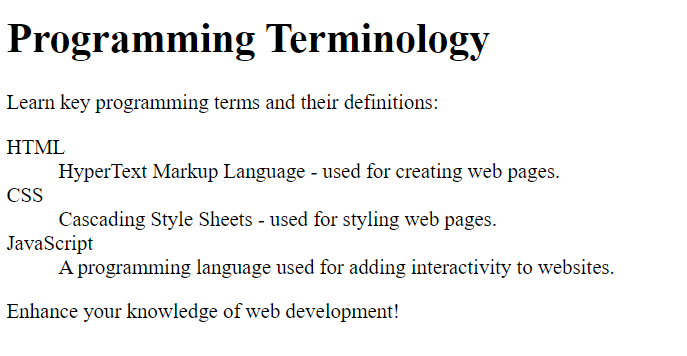
Lists are not only used for simple itemization but also play a crucial role in structuring content semantically. They help improve the readability and accessibility of web pages by providing a logical hierarchy for information. You can further enhance the appearance of lists using CSS to match the style of your website.
