CSS – Visibility
Certainly! In CSS, the visibility property is used to control the visibility of HTML elements on a web page. It can be a valuable tool for showing or hiding elements dynamically based on user interactions or other conditions. Here’s how you can use the visibility property:
1. Visible (visibility: visible;):
- This is the default value. Elements with
visibility: visible;are displayed on the web page as long as there are no other conflicting CSS rules or conditions hiding them.
2. Hidden (visibility: hidden;):
- Elements with
visibility: hidden;are not displayed on the web page, but they still take up space in the layout as if they were visible. This means that the element’s space is reserved, and it affects the layout flow, but it’s not visible to the user.
3. Collapse (visibility: collapse; – For table rows and columns):
- This value is specifically used with table-related elements like table rows (
<tr>) and columns (<col>). It behaves similarly tovisibility: hidden;but has specific effects within table structures.
Examples:
The visibility property in CSS is used to control the visibility of an HTML element. You can set it to visible, hidden, collapse, or initial. Here’s an example of how to use the visibility property in HTML:
<!DOCTYPE html>
<html>
<head>
<style>
/* CSS styles for the div element */
.hidden-div {
visibility: hidden; /* Hide the element but it still occupies space */
}
.collapsed-div {
visibility: collapse; /* Hide the element and collapse the space it occupies */
}
</style>
</head>
<body>
<div>This is a visible div.</div>
<div class="hidden-div">This div is hidden (visibility: hidden).</div>
<div class="collapsed-div">This div is collapsed (visibility: collapse).</div>
</body>
</html>Code language: HTML, XML (xml)Output :
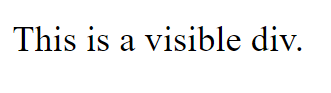
In this example:
- We create two CSS classes:
.hidden-divand.collapsed-div. - For
.hidden-div, we set thevisibilityproperty tohidden. This hides the element, but it still occupies space in the layout. - For
.collapsed-div, we set thevisibilityproperty tocollapse. This also hides the element and collapses the space it occupies.
You’ll notice that even though the .hidden-div is hidden, it still takes up space in the layout, while the .collapsed-div not only hides but also collapses the space it occupies. You can choose the appropriate value of the visibility property based on your design requirements.
The visibility property is a powerful tool for controlling the display of elements in a flexible and dynamic manner within web design. It allows you to create interactive and responsive user interfaces by selectively showing or hiding content as needed.
