CSS – Outlines
In CSS, an “outline” is a way to create a visible border around an HTML element, which is distinct from the actual border of the element. Outlines are often used to highlight elements when they gain focus, like when a user clicks on a form field or navigates through a webpage using the keyboard. They provide accessibility and visual feedback to users.
Here’s an example of how you can use CSS outlines:
<!DOCTYPE html>
<html>
<head>
<style>
/* Styling for the input field with an outline */
input:focus {
outline: 2px solid #007bff; /* Blue outline when focused */
}
</style>
</head>
<body>
<h2>Sample Form</h2>
<form>
<label for="username">Username:</label>
<input type="text" id="username" name="username">
</form>
</body>
</html>
Code language: HTML, XML (xml)Output :
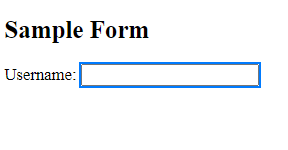
In this example:
- We have an HTML form with a label and an input field for the username.
- In the
<style>section, we use CSS to define the styling for the input field when it receives focus. The:focuspseudo-class targets the input when it’s clicked or selected. - We set the
outlineproperty to create a 2-pixel solid blue outline around the input when it’s focused. This gives the user a clear visual cue that they are interacting with this element.
So, when a user clicks inside the input field, they will see a blue outline around it. This outline not only enhances the visual experience but also aids in accessibility by indicating which element has received focus, especially important for users who navigate using the keyboard.
CSS Outline Width
In CSS, “outline width” refers to the thickness or width of the outline that you can apply to HTML elements. An outline is a visible border that appears around an element, typically used to indicate focus or interactivity.
You can control the width of this outline using the outline-width property in CSS. This property allows you to specify the thickness of the outline, and you can use various units like pixels, ems, or percentages to define the width.
In CSS, you can use the outline-width property to specify the width of an element’s outline. The outline is a border that is drawn around an element, typically when it receives focus. Here’s an example in HTML that demonstrates the use of outline-width:
<!DOCTYPE html>
<html>
<head>
    <style>
        /* CSS styles to set the outline width */
        .outlined-element {
            width: 200px;
            height: 100px;
            background-color: #336699;
            outline: 2px solid red; /* Set the outline width to 2px and the color to red */
        }
    </style>
</head>
<body>
    <h2>Element with Outline Width</h2>
    <div class="outlined-element">This div has an outline with a width of 2px.</div>
</body>
</html>Code language: HTML, XML (xml)
Output
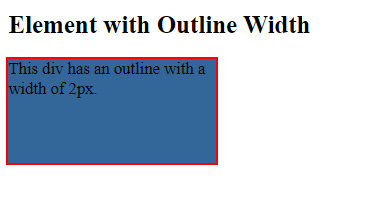
In this example:
- We have a
<div>element with the class.outlined-element. - In the CSS, we use the
outlineproperty to set the outline style. We specify a2pxwidth for the outline and set its color tored. Theoutlineproperty combines theoutline-width,outline-style, andoutline-colorproperties into a single declaration.
This results in the <div> element having a red outline with a width of 2px. You can adjust the outline-width value to make the outline thicker or thinner as needed for your HTML elements.
CSS Outline Style
In CSS, “outline style” refers to the pattern or style of the outline that you can apply to HTML elements. An outline is a visible border that appears around an element, often used to indicate focus or interactivity.
To control the style of this outline, you can use the outline-style property in CSS. This property allows you to specify the appearance of the outline, and it offers several options:
- Dotted: This style creates a series of small dots around the element’s border.
- Dashed: It produces a series of short dashes to form the outline.
- Solid: This is the default style and creates a continuous, solid line.
- Double: It draws two parallel lines for the outline.
- Groove: This style gives the outline a 3D, grooved appearance, making it look like it’s carved into the page.
- Ridge: Similar to groove, but it appears as if it’s raised.
- Inset: It makes the outline appear as though it’s pressed into the page.
- Outset: Similar to inset, but it gives the appearance of popping out of the page.
Example :
<!DOCTYPE html>
<html>
<head>
    <style>
        /* CSS styles to define outline styles for different elements */
        .container{
            display: flex;
        }
        .outlined-element {
            width: 100px;
            height: 40px;
            margin: 10px;
            padding: 10px;
            background-color: white;
            font-size: 10px;
        }
        .solid-outline {
            outline: 2px solid red; /* Solid outline */
        }
        .dotted-outline {
            outline: 2px dotted green; /* Dotted outline */
        }
        .dashed-outline {
            outline: 2px dashed blue; /* Dashed outline */
        }
        .double-outline {
            outline: 3px double orange; /* Double outline */
        }
        .groove-outline {
            outline: 3px groove purple; /* Groove outline */
        }
        .inset-outline {
            outline: 3px inset brown; /* Inset outline */
        }
        .outset-outline {
            outline: 3px outset teal; /* Outset outline */
        }
        .ridge-outline {
            outline: 3px ridge pink; /* Ridge outline */
        }
    </style>
</head>
<body>
    <h2>Outline Styles</h2>
    <div class="container">
        <div class="outlined-element solid-outline">Solid Outline</div>
        <div class="outlined-element dotted-outline">Dotted Outline</div>
        <div class="outlined-element dashed-outline">Dashed Outline</div>
        <div class="outlined-element double-outline">Double Outline</div>
        <div class="outlined-element groove-outline">Groove Outline</div>
        <div class="outlined-element inset-outline">Inset Outline</div>
        <div class="outlined-element outset-outline">Outset Outline</div>
        <div class="outlined-element ridge-outline">Ridge Outline</div>
    </div>
</body>
</html>Code language: HTML, XML (xml)
Output :

In this HTML file:
- We define various CSS classes (e.g.,
.solid-outline,.dotted-outline) to set different outline styles using theoutlineproperty. - Inside the
<body>, we have multiple<div>elements with the class.outlined-element, and each of them has a different outline style applied to it using the defined classes. - The outline styles include solid, dotted, dashed, double, groove, inset, outset, and ridge.
When you open this HTML file in a web browser, you will see different elements with various outline styles associated with them. You can observe how each outline style affects the appearance of the elements.
CSS – outline color :
In CSS, “outline color” refers to the color of the outline that you can apply to HTML elements. An outline is a visible border around an element, often used to indicate focus or interactivity.
To change the color of this outline, you can use the outline-color property in CSS. This property allows you to specify the color you want for the outline.
Example :
<!DOCTYPE html>
<html>
<head>
    <style>
        /* CSS styles to set the outline color */
        .container{
            display: flex;
        }
        .outlined-element {
            width: 100px;
            height: 30px;
            margin: 10px;
            background-color: white;
            outline-style: solid;
            outline-width: 3px;
        }

        .red-outline {
            outline-color: red; /* Red outline color */
        }

        .green-outline {
            outline-color: green; /* Green outline color */
        }

        .blue-outline {
            outline-color: blue; /* Blue outline color */
        }

        .orange-outline {
            outline-color: orange; /* Orange outline color */
        }
    </style>
</head>
<body>
    <h2>Outline Color</h2>
    <div class="container">
        <div class="outlined-element red-outline">Red Outline</div>
        <div class="outlined-element green-outline">Green Outline</div>
        <div class="outlined-element blue-outline">Blue Outline</div>
        <div class="outlined-element orange-outline">Orange Outline</div>
    </div>
</body>
</html>
Code language: HTML, XML (xml)
Output :
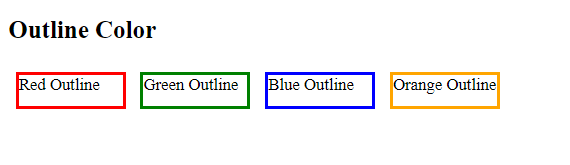
In this example:
- We have a
<div>element with the class.outlined-element. This element has a solid outline style with a width of3px. - In the CSS, we define different classes (e.g.,
.red-outline,.green-outline) to set various outline colors using theoutline-colorproperty. - Each
<div>element has one of these classes applied to it to specify a different outline color.
As a result, when you open this HTML file in a web browser, you will see different <div> elements with outlines of various colors. The outline-color property allows you to control the color of an element’s outline to suit your design needs.
Customizing the outline color is not only a way to enhance the visual appeal of your web design but also to improve accessibility by providing clear visual feedback to users, especially those who navigate using the keyboard.
CSS Outline Offset
In CSS, “outline offset” refers to the space between the outline of an HTML element and the element itself. It allows you to control how far the outline is positioned from the edges of the element.
This property, called outline-offset, is particularly useful when you want to create a visual separation between the outline and the element’s content or border. It helps you fine-tune the appearance of the outline.
Example :
In CSS, the outline-offset property is used to specify the space between the outline of an element and the outer edge of its border box. Here’s an example in HTML that demonstrates the use of outline-offset:
<!DOCTYPE html>
<html>
<head>
    <style>
        /* CSS styles to set the outline offset */
        .outlined-element {
            width: 200px;
            height: 100px;
            margin:20px;
            background-color: #336699;
            outline-style: solid;
            outline-color: red;
            outline-width: 3px;
            outline-offset: 10px; /* Set the outline offset to 10px */
        }
    </style>
</head>
<body>
    <h2>Outline Offset</h2>
    <div class="outlined-element">This div has an outline with an offset of 10px.</div>
</body>
</html>
Code language: HTML, XML (xml)
Output :
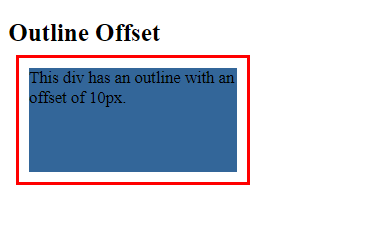
In this example:
- We have a
<div>element with the class.outlined-element. This element has a solid red outline style with a width of3pxand an outline offset of10px. - In the CSS, we use the
outline-offsetproperty to specify the space between the outline and the outer edge of the<div>element.
As a result, when you open this HTML file in a web browser, you will see the <div> element with a red outline, and there will be a space of 10px between the outline and the outer edge of the element’s border box. This demonstrates how outline-offset can be used to control the spacing between an element’s outline and its content or border.
