CSS – Backgrounds
Certainly! In CSS, backgrounds play a crucial role in web design, allowing you to style the background of elements such as the entire page, divs, or even specific sections. You can set background colors, images, gradients, and control how they are displayed. Let’s delve into the use of backgrounds in CSS:
1. Background Color: You can set the background color of an element using the background-color property. For example:
<!DOCTYPE html>
<html>
<head>
<title>Header Background Example</title>
<style>
/* CSS code to set the background color of the header */
header {
background-color: #4CAF50; /* Set the background color to a shade of green. */
padding: 20px; /* Add some padding for spacing. */
color: #fff; /* Set the text color to white for better visibility. */
}
</style>
</head>
<body>
<header>
<h1>Welcome to My Website</h1>
<p>Explore our content and services.</p>
</header>
</body>
</html>
Code language: HTML, XML (xml)Output :

2. Background Image: You can use images as backgrounds with the background-image property. For instance:
<!DOCTYPE html>
<html>
<head>
    <title>Background Image Example</title>
    <style>
        /* CSS code to set the background image for the banner */
        .banner {
            background-image: url('background.jpg'); /* Set the background image. */
            background-size: cover; /* Scale the image to cover the entire banner. */
            height: 300px; /* Set the height of the banner. */
            color: #fff; /* Set the text color to white for better visibility. */
            text-align: center; /* Center-align text content. */
            padding: 20px; /* Add padding for spacing. */
        }
    </style>
</head>
<body>
    <div class="banner">
        <h1>Welcome to Our Website</h1>
        <p>Discover our amazing products and services.</p>
    </div>
</body>
</html>
Code language: HTML, XML (xml)
Output :

3. Background Repeat: You can control how the background image is repeated using the background-repeat property:
<!DOCTYPE html>
<html>
<head>
    <title>Document</title>
    <style>
        header {
            /* Background image. */
            background-image: url('stripes.jpg');
            /* Repeats only horizontally. */
            background-repeat: repeat-x;
            height: 200px;
            background-size: 100px;
        }
    </style>
</head>
<body>
    <header></header>
</body>
</html>Code language: HTML, XML (xml)
Output :
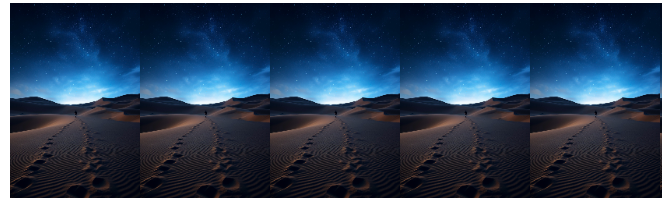
4. Background Position: Use background-position to determine where the background image starts:
<!DOCTYPE html>
<html>
<head>
    <title>Document</title>
    <style>

        header {
            /* Background image. */
            background-image: url('stripes.jpg');
           /* Position at the top-right corner. */
            background-position: right top;
            background-repeat: no-repeat;
            height: 200px;
            background-size: 100px;
        }
    </style>
</head>
<body>

      <header></header>

</body>
</html>Code language: HTML, XML (xml)
Output :

5. Background Attachment: The background-attachment property controls whether the background scrolls with the content or remains fixed:
<!DOCTYPE html>
<html>
<head>
    <title>Background Attachment Example</title>
</head>

<body>
    <style>
        body {
            background-image: url('background-image.jpg');
            background-repeat: no-repeat;
            background-size: cover;
        }

        .content {
            padding: 20px;
            background-color: rgba(255, 255, 255, 0.7);
            border-radius: 10px;
            margin: 20px;
            box-shadow: 0 0 10px rgba(0, 0, 0, 0.2);

            /* Set the background attachment to 'fixed' */
            background-attachment: fixed;
        }

        h1,
        p {
            text-align: center;
        }
    </style>
    <div class="content">
        <h1>Background Attachment Example</h1>
        <p>Lorem ipsum dolor sit amet, consectetur adipiscing elit. Nulla vestibulum eros euismod tincidunt
            sollicitudin.</p>
    </div>
</body>
</html>Code language: HTML, XML (xml)
Output :
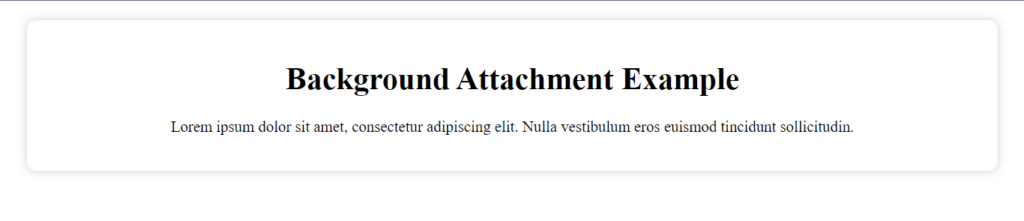
6. Background Gradient: You can create gradients using the linear-gradient or radial-gradient functions:
<!DOCTYPE html>
<html>
<head>
    <title>Document</title>
    <style>
        div {
            width: 400px;
            height: 250px;
            background: linear-gradient(to bottom, #3498db, #2980b9);
            /* Vertical linear gradient. */
        }
    </style>
</head>
<body>
   <div></div>
</body>
</html>Code language: HTML, XML (xml)
Output :

7. Background Shorthand: You can use the background shorthand property to set multiple background properties at once:
<!DOCTYPE html>
<html>
<head>
    <title>Background Shorthand Example</title>
    <style>
        /* CSS code to set multiple background properties using the "background" shorthand */
        .banner {
            background:
                url('banner-image.jpg') no-repeat center center, /* Background image */
                linear-gradient(to bottom, rgba(0, 0, 0, 0.5), rgba(0, 0, 0, 0.8)); /* Gradient overlay */
            background-size: cover; /* Scale the background image to cover the entire banner */
            height: 300px; /* Set the height of the banner */
            color: #fff; /* Set the text color to white for better visibility */
            text-align: center; /* Center-align text content */
            padding: 20px; /* Add padding for spacing */
        }
    </style>
</head>
<body>
    <div class="banner">
        <h1>Welcome to Our Website</h1>
        <p>Discover our amazing products and services.</p>
    </div>
</body>
</html>
Code language: HTML, XML (xml)
Output :

These are some of the key ways to utilize backgrounds in CSS to enhance the visual appeal of your web pages. By combining these techniques and properties, you can create engaging and aesthetically pleasing designs that make your website more attractive to visitors.
