---
title: "JavaScript – The Number Object"
url: https://khanwaseem.com/blog/programming-language/javascript-the-number-object
author: "khan Waseem"
published: 2023-10-01
updated: 2023-10-01
topics: ["Programming Language"]
description: "Learn about JavaScript’s Number Object: Create numeric values, perform operations, handle NaN and infinity, and use methods and properties effectively"
---
# JavaScript – The Number Object
In JavaScript, the **`Number` **object is a built-in object that provides methods and properties for working with numeric values. It represents both integer and floating-point numbers and allows you to perform various operations on them.
Table of Contents
[Toggle](#)
- [Understanding the Number Object](#understanding-the-number-object)[Creating Number Objects](#creating-number-objects)
- [Number Properties](#number-properties)
- [Number Methods](#number-methods)
- [Practical Applications](#practical-applications)[1. Mathematical Operations](#1-mathematical-operations)
- [2. Data Validation](#2-data-validation)
- [3. Number Formatting](#3-number-formatting)
- [4. Financial Calculations](#4-financial-calculations)
- [Conclusion](#conclusion)
### Understanding the Number Object
In JavaScript, the `Number` object is a global object that represents numerical values. It is important to distinguish between primitive number values and the `Number` object. Primitive number values are represented directly as numbers, whereas the `Number` object is a wrapper around primitive number values, providing additional functionality.
Let’s start by exploring some basic features of the `Number` object.
#### Creating Number Objects
You can create a `Number` object using its constructor:
```javascript
let num = new Number(42);Code language: JavaScript (javascript)
```
However, in most cases, you won’t need to create `Number` objects explicitly, as JavaScript automatically converts primitive numbers to `Number` objects when needed.
#### Number Properties
The `Number` object has several useful properties:
- `Number.MAX_VALUE`: Represents the largest positive finite number that can be represented in JavaScript.
- `Number.MIN_VALUE`: Represents the smallest positive finite number.
- `Number.POSITIVE_INFINITY`: Represents positive infinity.
- `Number.NEGATIVE_INFINITY`: Represents negative infinity.
- `Number.NaN`: Represents “Not-a-Number,” a special value used to indicate an unrepresentable value.
#### Number Methods
The `Number` object provides various methods for working with numeric values:
- `toFixed()`: Formats a number with a specified number of decimal places.
- `toPrecision()`: Formats a number with a specified total number of digits.
- `toString()`: Converts a number to a string.
- `parseInt()`: Parses a string and returns an integer.
- `parseFloat()`: Parses a string and returns a floating-point number.
- `isFinite()`: Checks if a value is a finite number.
- `isNaN()`: Checks if a value is NaN.
### Practical Applications
Now that we’ve covered the basics of the `Number` object, let’s explore some real-world scenarios where it comes in handy.
#### 1. Mathematical Operations
The `Number` object is essential for performing mathematical operations in JavaScript. Whether you’re calculating simple arithmetic expressions or complex mathematical algorithms, `Number` objects allow you to work with precision and control.
```javascript
let x = 10;
let y = 3;
let result = new Number(x / y); // Using Number object for precision
console.log(result.toFixed(2)); // Outputs: "3.33"Code language: JavaScript (javascript)
```
#### 2. Data Validation
When working with user input or external data sources, it’s crucial to validate numeric values. The `isNaN()` method of the `Number` object is a valuable tool for checking if a value is a valid number.
```javascript
let userInput = "42";
if (!isNaN(userInput)) {
let numValue = parseFloat(userInput);
// Process the valid numeric input
} else {
// Handle invalid input
}Code language: JavaScript (javascript)
```
#### 3. Number Formatting
Formatting numbers for display is a common requirement in web development. The `Number` object’s `toLocaleString()` method can be used to format numbers according to the user’s locale, adding thousands separators and respecting regional conventions.
```javascript
let number = 10000;
let formattedNumber = new Number(number).toLocaleString(); // "10,000" (in many locales)Code language: JavaScript (javascript)
```
#### 4. Financial Calculations
In finance-related applications, precise handling of monetary values is critical. The `Number` object’s `toFixed()` method is often used to round and format currency amounts.
```javascript
let price = 49.99;
let taxRate = 0.08;
let totalPrice = new Number(price + price * taxRate).toFixed(2); // "54.00"Code language: JavaScript (javascript)
```
**Example : **
```javascript
Number Object Example
JavaScript Number Object Example
Code language: JavaScript (javascript)
```
**Output : **
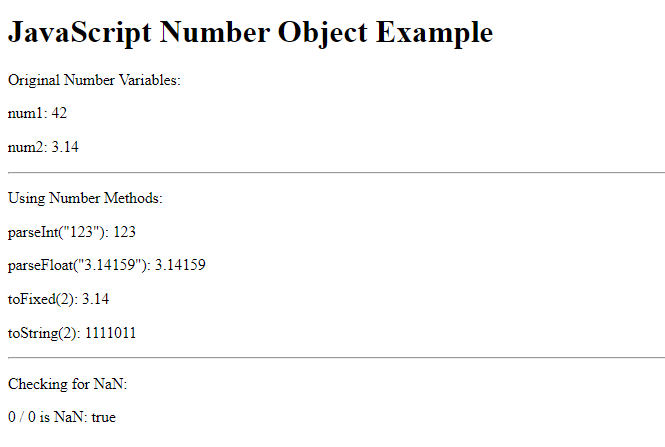
In this HTML example, we start by creating numeric variables (`num1` and `num2`). Then, we demonstrate various Number Object methods:
- We convert a string to an integer using `parseInt()`.
- We convert a string to a floating-point number using `parseFloat()`.
- We format a floating-point number with two decimal places using `toFixed()`.
- We convert an integer to a binary string using `toString()` with base 2.
Additionally, we show how to check if a value is NaN using `isNaN()` and display the results within the HTML document.
This example helps illustrate the practical usage of the JavaScript Number Object within an HTML context.
### Conclusion
The `Number` object in JavaScript is a versatile tool for working with numeric data. Understanding its properties and methods empowers developers to perform mathematical operations, validate data, format numbers, and handle a wide range of practical scenarios effectively.
As you continue your journey in JavaScript development, remember that mastering the `Number` object is just one step toward becoming a proficient programmer. Practice, experimentation, and a deep understanding of JavaScript’s capabilities will help you build robust and dynamic web applications.
### Related posts:
[JavaScript -Strings](https://blog.khanwaseem.com/javascript-strings/)
[Regular Expressions and RegExp Object](https://blog.khanwaseem.com/regular-expressions-and-regexp-object/)
[JavaScript – The Math Object](https://blog.khanwaseem.com/javascript-the-math-object/)
[JavaScript – Operators](https://blog.khanwaseem.com/javascript-operators/)
Powered by [YARPP](https://yarpp.com).