---
title: "React Router"
url: https://khanwaseem.com/blog/course/react-router
author: "khan Waseem"
published: 2023-10-20
updated: 2023-10-23
topics: ["course", "React Tutorial"]
description: "“Learn how to implement React Router for seamless navigation in your web applications with this comprehensive guide.”"
---
# React Router
In the world of modern web development, building robust, interactive web applications is a common goal. For most applications, navigation is a fundamental requirement. Users expect a seamless way to move between different sections and views within an application. This is where React Router, a vital tool in the React ecosystem, comes into play.
Table of Contents
[Toggle](#)
- [1. Introduction to React Router](#1-introduction-to-react-router)[Why Use React Router?](#why-use-react-router)
- [2. Getting Started with React Router](#2-getting-started-with-react-router)[Installing React Router](#installing-react-router)
- [Configuring Routes](#configuring-routes)
- [3. Basic Routing in React](#3-basic-routing-in-react)[The Role of Route Components](#the-role-of-route-components)
- [Navigational Links](#navigational-links)
- [4. Dynamic Routing with Route Parameters](#4-dynamic-routing-with-route-parameters)[Working with Dynamic Route Parameters](#working-with-dynamic-route-parameters)
- [5. Nested Routing for Complex Apps](#5-nested-routing-for-complex-apps)[Nested Routing Example](#nested-routing-example)
- [6. Programmatic Navigation](#6-programmatic-navigation)[Programmatically Navigating to Routes](#programmatically-navigating-to-routes)
- [7. Route Guards for Authentication](#7-route-guards-for-authentication)[Implementing a Route Guard](#implementing-a-route-guard)
- [8. React Router Best Practices](#8-react-router-best-practices)
- [9. Conclusion](#9-conclusion)
## 1. Introduction to React Router
React Router is a popular library in the React ecosystem that helps developers manage navigation and routing in single-page applications. It allows you to define routes, mapping them to specific components, and handles the rendering of these components when the application’s URL changes. React Router simplifies the development of dynamic and interactive web applications.
### Why Use React Router?
React Router is essential for several reasons:
- **Single-Page Applications (SPAs):** It enables the creation of SPAs where content updates without full page reloads, providing a smooth and fast user experience.
- **Nested Routing:** React Router supports nested routing, allowing for complex page structures with child routes.
- **Programmatic Navigation:** It provides an API for programmatically navigating to different routes, which is useful for form submissions, user authentication, and other dynamic interactions.
- **Route Parameters:** You can work with dynamic route parameters, facilitating the display of variable content.
- **Route Guards:** Implement route guards to control access to specific routes based on user authentication or other conditions.
## 2. Getting Started with React Router
Before diving into the intricacies of `React Router`, it’s crucial to set it up in your project. Let’s go through the essential steps:
### Installing React Router
You can install `React Router` using npm or yarn. For the latest version (React Router v6), use this command:
```bash
npm install react-router-dom@6Code language: Bash (bash)
```
### Configuring Routes
In your application, you’ll typically set up routes in your main component file. Here’s a basic example:
```xml
import { BrowserRouter, Route, Switch } from 'react-router-dom';
function App() {
return (
);
}
export default App;Code language: HTML, XML (xml)
```
In this code, we import components from the **‘react-router-dom’ **package and define routes using the **** and ** **components.
## 3. Basic Routing in React
Now that `React Router` is set up, it’s time to explore basic routing.
### The Role of Route Components
The **** component is the core building block of routing with React Router. It defines a route by mapping a URL path to a specific component. Let’s examine the code snippet:
```xml
Code language: HTML, XML (xml)
```
- The **path **prop in each **** component specifies the URL path that the route corresponds to.
- The **component **prop determines which React component should be rendered when the route matches.
For example, when a user navigates to the root URL ‘/’, the **Home **component is rendered. Similarly, the **About **component is rendered when the URL path is ‘/about’, and the **Contact **component is displayed for ‘/contact’.
### Navigational Links
In a real application, you’ll want users to navigate between these routes. To create navigational links, you can use the **`<`Link`>` **component:
```xml
import { Link } from 'react-router-dom';
function Navigation() {
return (
);
}
export default Navigation;Code language: HTML, XML (xml)
```
**Output : **
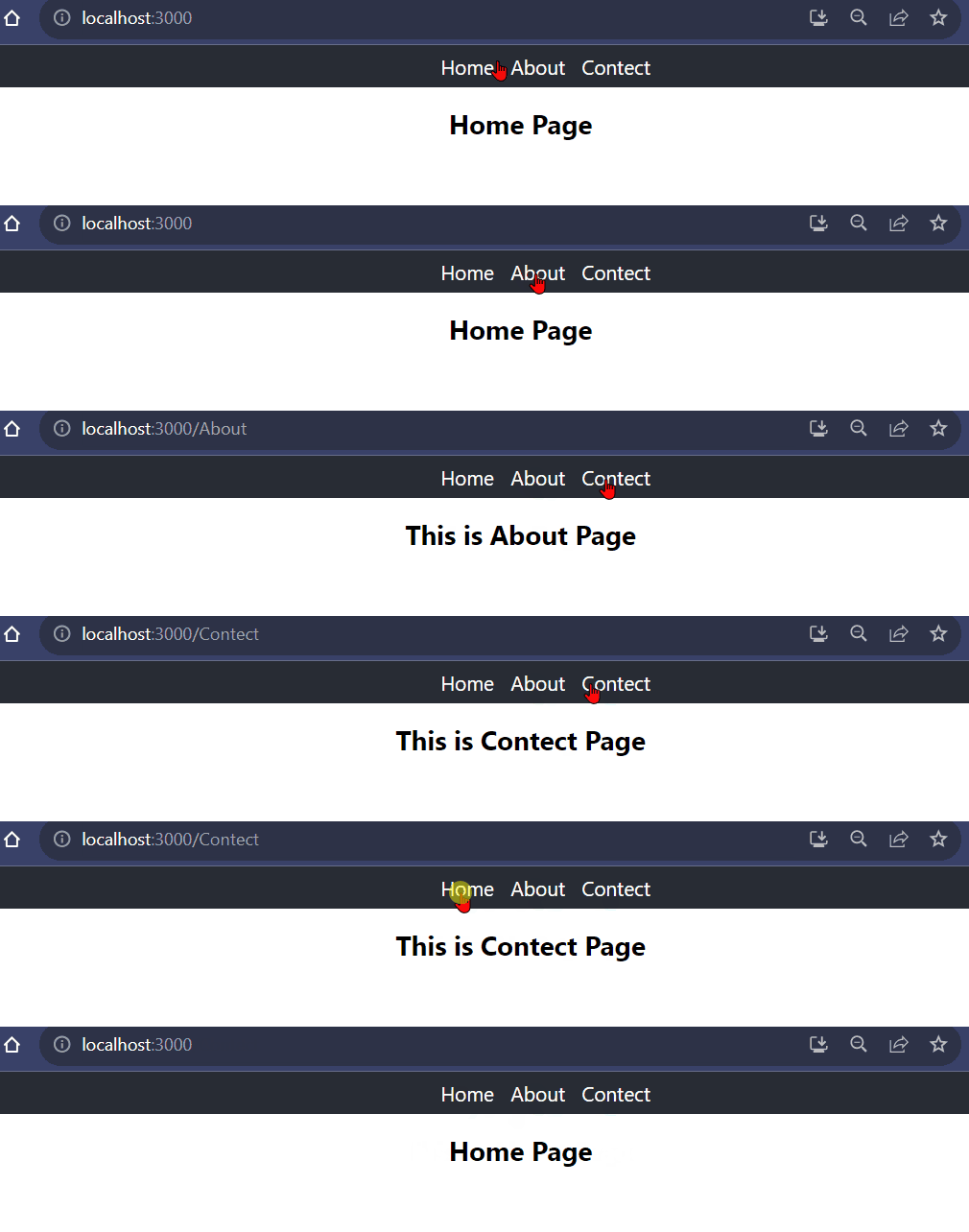
The **** component generates clickable links that take users to the specified route when clicked. It ensures smooth navigation between different views in your application.
## 4. Dynamic Routing with Route Parameters
In many real-world applications, you’ll need to handle dynamic data and routes. `React Router` simplifies dynamic routing with route parameters.
### Working with Dynamic Route Parameters
To work with dynamic route parameters, you can include a colon (‘:’) in the route path. For example, a route path of ‘/user/:id’ signifies that ‘id’ is a dynamic parameter that can change.
```xml
Code language: HTML, XML (xml)
```
To access the route parameters in your component, you can use the **useParams **hook:
```xml
import { useParams } from 'react-router-dom';
function UserProfile() {
const { id } = useParams();
return
User Profile of ID: {id}
;
}Code language: HTML, XML (xml)
```
In this example, we’ve defined a route with the path ‘/user/:id’. When the user navigates to a URL like ‘/user/123’, the **UserProfile **component receives the ‘id’ parameter, allowing you to display user-specific content.
## 5. Nested Routing for Complex Apps
As your application grows, you may need to create complex page structures with nested routes. React Router supports nested routing to handle such scenarios.
### Nested Routing Example
Imagine a dashboard page with multiple tabs, where each tab is a nested route:
```xml
Code language: HTML, XML (xml)
```
In this example, the **Dashboard **component is the parent route and contains nested routes for ‘Overview’ and ‘Analytics’. When users navigate to ‘/dashboard/overview’, the **Overview **component is rendered, and for ‘/dashboard/analytics’, the **Analytics **component is displayed.
Nested routing allows you to manage complex page structures while maintaining a clear and organized codebase.
## 6. Programmatic Navigation
There are situations in which you need to navigate programmatically in response to user actions, form submissions, or other dynamic interactions. React Router provides the **useHistory **hook for programmatic navigation.
### Programmatically Navigating to Routes
Here’s how you can programmatically navigate to a new route using the **useHistory **hook:
```xml
import { useHistory } from 'react-router-dom';
function App() {
const history = useHistory();
const handleClick = () => {
history.push('/new-route');
};
return (
);
}Code language: HTML, XML (xml)
```
In this example, the **useHistory **hook provides access to the **history **object. The **history.push()** method is used to navigate to a new route when a button is clicked.
## 7. Route Guards for Authentication
In many applications, you’ll need to protect certain routes and ensure that only authenticated users can access them. React Router allows you to implement route guards to handle these scenarios.
### Implementing a Route Guard
Here’s an example of protecting a route using a route guard:
```xml
import { Route, Redirect } from 'react-router-dom';
function PrivateRoute({ children, isAuthenticated, ...rest }) {
return (
isAuthenticated ? (
children
) : (
)
}
/>
);
}Code language: HTML, XML (xml)
```
In this code, the **PrivateRoute **component checks whether the user is authenticated. If the user is authenticated, it renders the protected route specified by **children**. If not, it redirects the user to the login page, preserving the intended destination.
## 8. React Router Best Practices
To make the most of React Router and provide a smooth user experience, consider the following best practices:
- Organize your route configuration in a separate file to maintain a clean and structured codebase.
- Use route parameters for dynamic content and nested routing for complex page structures.
- Implement route guards to protect sensitive routes and ensure proper user authentication and authorization.
- Thoroughly test your routing logic to identify and resolve navigation issues early in the development process.
## 9. Conclusion
React Router is a fundamental tool for navigation and routing in React applications. Whether you’re creating single-page applications with dynamic content, nested routes, or authentication requirements, React Router offers the flexibility and power needed to provide a seamless user experience.
Start building impressive web applications with React Router, and provide your users with an intuitive and engaging navigation experience.
### Related posts:
[Angular Front End: Your Web Development Solution](https://blog.khanwaseem.com/angular-front-end-your-web-development-solution/)
[Growing stunning websites with React : A Step-via-Step manual](https://blog.khanwaseem.com/what-is-react/)
[HTML – Attributes](https://blog.khanwaseem.com/html-attributes/)
[Passing Props to a Component](https://blog.khanwaseem.com/passing-props-to-a-component/)
Powered by [YARPP](https://yarpp.com).