---
title: "useEffect React Hooks"
url: https://khanwaseem.com/blog/course/react-hooks-useeffect
author: "khan Waseem"
published: 2023-10-20
updated: 2023-10-20
topics: ["course", "React Tutorial"]
description: "Explore the power of the useEffect Hook in React, mastering side effects and dynamic behavior for responsive user interfaces."
---
# useEffect React Hooks
React, the popular JavaScript library for building user interfaces, introduced Hooks in version 16.8. These Hooks allow you to add state and side effects to functional components, eliminating the need for class components. Among these Hooks, the **`useEffect` **Hook is one of the most essential and versatile.
Table of Contents
[Toggle](#)
- [What is the useEffect Hook?](#what-is-the-useeffect-hook)
- [The Basics of useEffect](#the-basics-of-useeffect)
- [Understanding the Dependency Array](#understanding-the-dependency-array)
- [Common Use Cases for useEffect](#common-use-cases-for-useeffect)
- [Cleaning Up Effects](#cleaning-up-effects)
- [Dealing with Multiple Effects](#dealing-with-multiple-effects)
- [Conclusion](#conclusion)
### What is the useEffect Hook?
`useEffect` is a Hook in React that enables you to perform side effects in your functional components. Side effects can include data fetching, DOM manipulation, and subscriptions. It is the functional component equivalent of the lifecycle methods in class components, such as `componentDidMount`, `componentDidUpdate`, and `componentWillUnmount`.
### The Basics of useEffect
To use the `useEffect` Hook, you pass it two arguments: a function that contains the code for the side effect and an array of dependencies. The function is where you put your side effect logic, and the array of dependencies is optional. If provided, it determines when the effect runs.
Here’s a simple example of using `useEffect` to fetch data from an API:
```xml
import React, { useState, useEffect } from 'react';
function DataFetcher() {
const [data, setData] = useState([]);
useEffect(() => {
// Fetch data from an API
fetch('https://jsonplaceholder.typicode.com/users')
.then((response) => response.json())
.then((result) => setData(result));
}, []); // The empty dependency array ensures this effect runs once
return (
Fetched Data
Id
Name
Email
Address
{data.map((item) => (
<>
{item.id}
{item.name}
{item.email}
{item.address.city}
))}
);
}
export default DataFetcher;Code language: HTML, XML (xml)
```
**Output : **
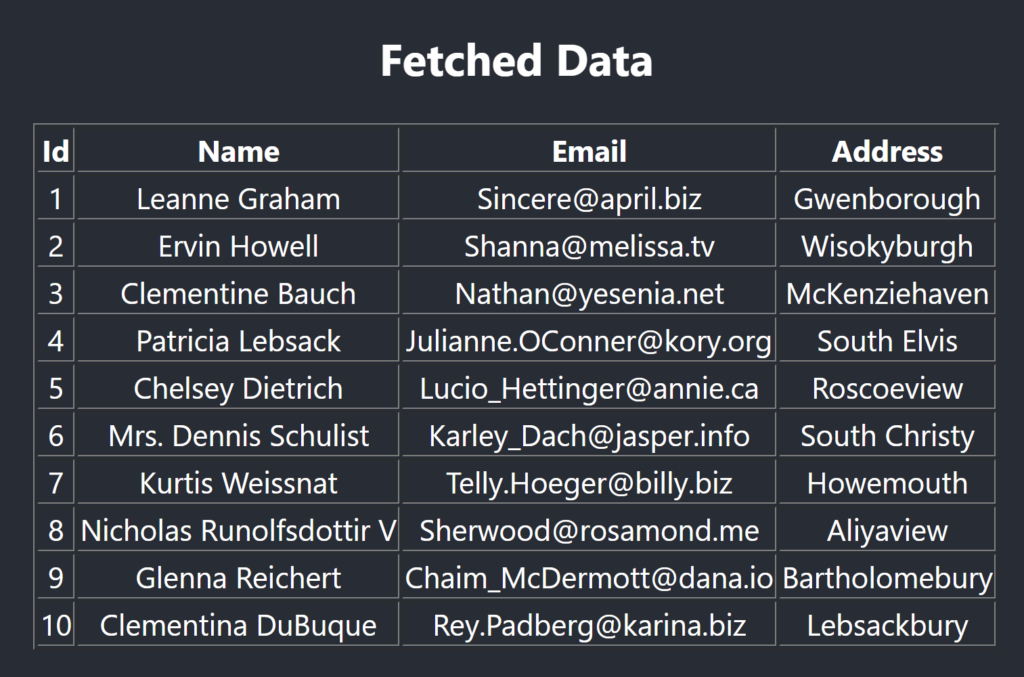
In this example, we import `useEffect` and use it to fetch data from an API. The empty dependency array (`[]`) ensures that the effect runs only once after the initial render. This is a common pattern for performing initialization or fetching data when the component mounts.
### Understanding the Dependency Array
The dependency array is a critical concept when using `useEffect`. It specifies which values from the component’s scope should be considered as dependencies. When any of these dependencies change, the effect is re-run. If you omit the dependency array, the effect runs after every render.
For instance, if you have a variable `count` that you want to monitor for changes, you include it in the dependency array:
```xml
useEffect(() => {
// Effect logic
}, [count]);Code language: HTML, XML (xml)
```
However, if you want the effect to run only once when the component mounts, you pass an empty dependency array:
```xml
useEffect(() => {
// Effect logic
}, []);Code language: HTML, XML (xml)
```
### Common Use Cases for useEffect
The `useEffect` Hook is incredibly versatile and can be used for various purposes, including:
- **Data Fetching:** Fetching data from APIs, databases, or external sources.
- **DOM Manipulation:** Modifying the DOM, such as adding or removing elements.
- **Subscriptions:** Managing subscriptions, such as WebSocket connections or event listeners.
- **Side Effects:** Any other asynchronous or non-pure functions that need to be executed.
### Cleaning Up Effects
In some cases, you may need to perform cleanup when the component unmounts or when the dependencies change. This is where the **`useEffect` **Hook’s return function comes into play.
For example, if you’re setting up a subscription, you should clean it up when the component unmounts to prevent memory leaks. You can do this by returning a cleanup function from the effect:
```xml
useEffect(() => {
// Setup subscription
const subscription = subscribe();
// Cleanup on unmount or when the dependency changes
return () => {
unsubscribe(subscription);
};
}, [dependency]);Code language: HTML, XML (xml)
```
### Dealing with Multiple Effects
You can use multiple `useEffect` Hooks in a single component to separate concerns and organize your code. This can make your code more readable and maintainable. Each effect operates independently and can have its own dependency array.
Here’s an example of a component with multiple effects:
```xml
function MultipleEffectsExample() {
const [count, setCount] = useState(0);
useEffect(() => {
document.title = `Count: ${count}`;
}, [count]);
useEffect(() => {
// Fetch data when count changes
fetch('https://api.example.com/data?count=' + count)
.then((response) => response.json())
.then((result) => console.log(result));
}, [count]);
return (
Count: {count}
);
}Code language: HTML, XML (xml)
```
In this example, there are two effects: one updates the document title when `count` changes, and the other fetches data when `count` changes.
### Conclusion
The **useEffect **Hook is a fundamental tool for managing side effects and performing asynchronous operations in React functional components. By understanding its usage and the role of dependency arrays, you can efficiently handle data fetching, DOM manipulation, subscriptions, and more. **useEffect **empowers you to build responsive and dynamic user interfaces while adhering to React’s declarative and component-based approach. Whether you’re building a simple blog app or a complex e-commerce platform, the **useEffect** Hook is your ally for adding interactivity and data-driven behavior to your React applications.
### Related posts:
[Custom Hook – React Hook](https://blog.khanwaseem.com/custom-hook-react-hook/)
[React State Management](https://blog.khanwaseem.com/react-state/)
[React Redux](https://blog.khanwaseem.com/react-redux/)
[Data Fetching in Next.js](https://blog.khanwaseem.com/data-fetching-in-next-js/)
Powered by [YARPP](https://yarpp.com).