---
title: "JavaScript – Objects Overview"
url: https://khanwaseem.com/blog/course/javascript-objects-overview
author: "khan Waseem"
published: 2023-10-01
updated: 2023-10-01
topics: ["course", "Javascript Tutorial"]
description: "Explore the world of JavaScript objects: creation, properties, methods, and prototypes. Learn how to wield this fundamental data structure effectively."
---
# JavaScript – Objects Overview
In JavaScript, objects are a fundamental data type that allow you to store and organize data in a structured way. They are often described as collections of key-value pairs, where each key is a unique identifier for a value. Objects are used extensively in JavaScript, and understanding how they work is crucial for effective programming.
Here’s an overview of JavaScript objects:
**1. Key-Value Pairs:** Objects consist of key-value pairs, where each key is a string (or a Symbol in some cases) that acts as a label for a corresponding value. These values can be of any data type, including other objects, functions, numbers, strings, and more.
**2. Creating Objects:** You can create an object in JavaScript using two main methods: object literals and constructors. Object literals are the simplest way to create objects, where you define the keys and values within curly braces, like this:
```javascript
let person = {
name: "John",
age: 30,
isEmployed: true
};Code language: JavaScript (javascript)
```
**3. Accessing Properties:** You can access the values stored in an object using either dot notation or square brackets. For example:
```javascript
let name = person.name; // Using dot notation
let age = person["age"]; // Using square bracketsCode language: JavaScript (javascript)
```
**4. Adding and Modifying Properties:** You can add new key-value pairs to an object or modify existing ones by simply assigning a new value to a key.
```javascript
person.gender = "Male"; // Adding a new property
person.age = 31; // Modifying an existing propertyCode language: JavaScript (javascript)
```
**5. Removing Properties:** You can delete a property from an object using the `delete` keyword:
```javascript
delete person.isEmployed; // Removing a propertyCode language: JavaScript (javascript)
```
**6. Methods:** Objects can also contain functions as values. These functions are called methods and can be invoked using the object they belong to:
```javascript
let car = {
brand: "Toyota",
start: function() {
console.log("Engine started");
}
};
car.start(); // Invoking the methodCode language: JavaScript (javascript)
```
**7. Iterating Over Properties:** You can loop through an object’s properties using `for...in` loops:
```javascript
for (let key in person) {
console.log(key + ": " + person[key]);
}Code language: JavaScript (javascript)
```
**8. Object Prototypes:** In JavaScript, objects can inherit properties and methods from other objects through a mechanism called prototypes. This forms the basis of object-oriented programming in JavaScript.
**Example : **
```xml
Book List
My Book List
Code language: HTML, XML (xml)
```
**Output : **
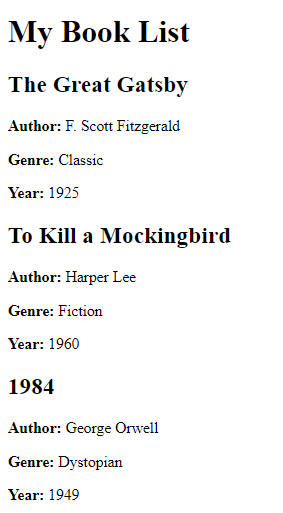
In this example, we have an HTML page with a `` element with the id “book-list” where we’ll display our list of books. Inside the `