---
title: "CSS – Validations"
url: https://khanwaseem.com/blog/course/css-validations
author: "khan Waseem"
published: 2023-09-18
updated: 2023-09-18
topics: ["course", "CSS Tutorial"]
description: "CSS validations: Ensure error-free, compatible, and efficient CSS code for a seamless web experience. Check syntax, compatibility, and accessibility."
---
# CSS – Validations
Certainly! In the context of CSS, “validations” typically refer to ensuring that your CSS code adheres to the syntax and rules of the CSS language. Here’s a brief overview of CSS validations:
- **Syntax Validation:** This is the most basic form of validation, ensuring that your CSS code is written correctly with the appropriate use of selectors, properties, and values. CSS code should be free of syntax errors, such as missing or mismatched brackets, semicolons, or quotation marks.
- **Compatibility Validation:** It involves checking that your CSS code is compatible with various web browsers. Different browsers may interpret CSS rules slightly differently, so it’s essential to test your code in multiple browsers to ensure consistent rendering.
- **Linting:** Linting tools, like CSSLint and Stylelint, help identify potential issues in your CSS code by enforcing coding standards and best practices. They can catch issues like unused selectors, redundant code, or incorrect property values.
- **Vendor Prefix Validation:** CSS vendor prefixes (e.g., -webkit-, -moz-, -ms-) are used to apply experimental or browser-specific CSS properties. Validating vendor prefixes involves ensuring that you’re using them correctly for specific properties and that you’re only using them when necessary, as they can become outdated as browsers evolve.
- **Accessibility Validation:** Ensuring that your CSS styles do not hinder web accessibility is crucial. You should validate that your styles are compatible with screen readers, keyboard navigation, and other assistive technologies.
- **Performance Validation:** CSS can impact the performance of a web page. Validation in this context involves optimizing your styles to minimize file size and render times. Techniques like CSS minification and compression can be applied to improve performance.
- **Responsive Design Validation:** When creating responsive designs, it’s essential to validate that your CSS media queries work correctly and that your layout adjusts appropriately to different screen sizes and orientations.
- **Validation Services:** There are online validation services and tools that can help you check your CSS code against industry standards and specifications, such as the W3C CSS Validation Service.
**Example : **
CSS doesn’t handle form validations; it’s primarily used for styling and layout. Form validation in HTML is typically done using JavaScript or by utilizing HTML5 form attributes like `required`, `min`, `max`, `pattern`, etc. However, you can style validation messages and form elements using CSS.
Here’s a simple example of how you can style form validation messages using CSS:
```xml
CSS Validation Example
Code language: HTML, XML (xml)
```
**Output : **
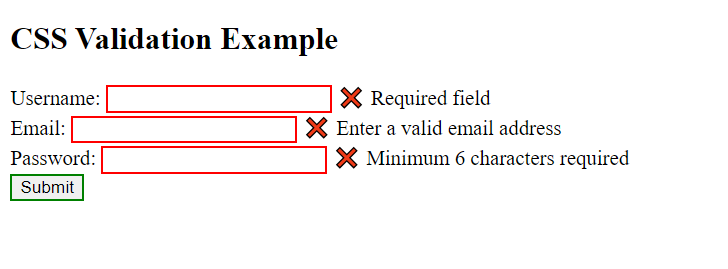
**In this example:**
- We’ve created a simple HTML form with input fields for username, email, and password.
- We use the `required` attribute to make sure the user fills in these fields.
- We’ve applied CSS to style the input fields when they are invalid (`input:invalid`) and when they are valid (`input:valid`).
- We’ve also added custom messages using the `::before` pseudo-element and styled them differently for invalid and valid inputs.
When you run this HTML in a web browser and interact with the form, you’ll see that the input fields are styled differently based on whether they are valid or invalid, and custom messages are displayed accordingly. This demonstrates how CSS can be used to style form validation messages and input elements.
By performing these various forms of validation, you can ensure that your CSS code is error-free, compatible with different browsers, adheres to best practices, and contributes to a positive user experience on your website. Validation is an integral part of the web development process, helping you maintain code quality and avoid potential issues.
### Related posts:
[HTML – Forms](https://blog.khanwaseem.com/html-forms/)
[JavaScript – Form](https://blog.khanwaseem.com/javascript-form-validation/)
[React Form](https://blog.khanwaseem.com/react-form/)
[JavaScript-Form properties and methods](https://blog.khanwaseem.com/javascript-form-properties-and-methods/)
Powered by [YARPP](https://yarpp.com).